tinyg / tgfx hangs

From the original Synthetos forum (2011–2025)

Started by cswiger2 on in TinyG Support. 8 replies, last activity Dec 6, 2014.

#

Hi - I'm having an issue with large curvy projects in tgfx / tinyg, using a laser, where the work will pause - tgfx shows there is movement but the motors just hang while the laser burns a darker spot than it should. Is this caused by overloading the processor or some kind of buffering issue?

Here's a video of it happening, sort of - it can be worse than what I recorded here: https://www.youtube.com/watch?v=igH4Mysga5E

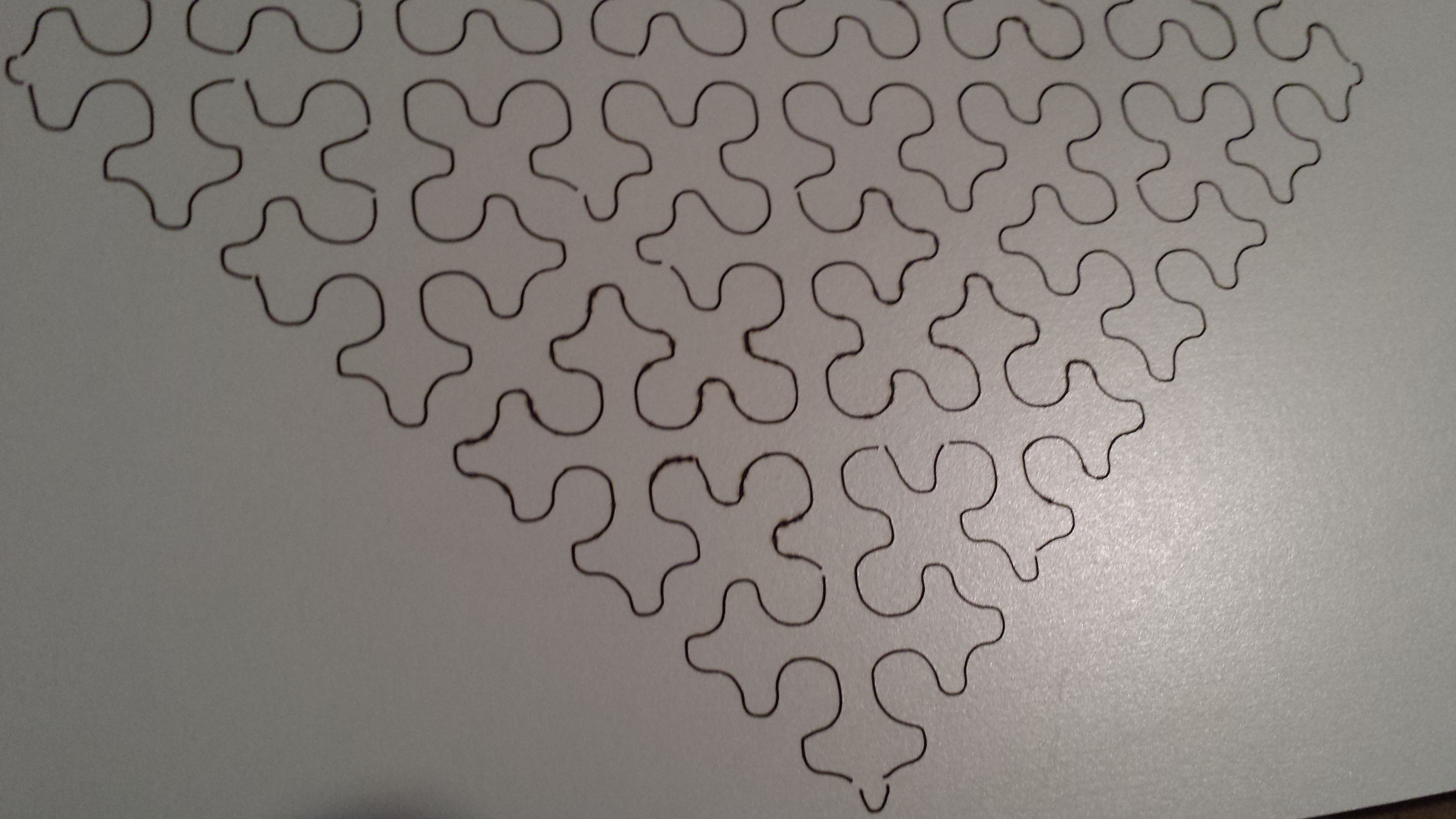
Here's a pic of the results, where you can see the uneven burn spots where the tinyg just stops to think or catch up on the queue:

http://swigerco.com/20141124_134730.jpg

#

Sure - thanks for reply. Have a fairly recent fw upgrade and windows app.
From the $$:

[fb] firmware build 435.10
[fv] firmware version 0.97
[hp] hardware platform 1.00
[hv] hardware version 8.00

and using tgFX_windows - rc1- x86 x64 build 3625 - v0.97

Here's the dropbox link:

https://www.dropbox.com/sh/ohe91wwmlsfvm1t/AAA3hIEx7t45igZrb4D8edSia?dl=0

and in there's the recently troublesome nc file and the full $$ dump.

Staff #

On the road at the moment, will give a harder look in 24 hrs.

I suggest you move to tinyG fw 438.02 (current edge)and give it a try.

#

Actually it's starting to look like the issue s with tgFX - just found a long job going into LOONG pauses, and when I hit 'pause' on the gcode program panel the motors stopped mmediately, but the display and position indcators continued to update - like they were catching up - for some time, then when I hit 'resume' it continued w/o problem, until of course they get out of sync again. My notebook cpu is near maxed out so 'll try closing some things.

#

Yes - problem solved, was running out of resources on the notebook runnng tgFX - gotta remember this *is* java ;) - it'll use up 50% cpu on an Intel Core2 Duo T6500 @2.10GHz. As long as I shut enough down everything is workng fine on an ultra-long (52 minutes so far at 75mm / sec) laser cut.

:)

Staff #

Good news that something works, but I am not at all certain what it is that is working:

You are running tgFX build 3625.
Did you update to tinyG 438.02, or stay with 435.10?

It is possible that communication/flow control issues are at play if you stayed with 435.10. tgFX was the outgrowth of tweaks to make tinyG 438.02 and tgFX cooperate well

Resource issues are incredibly hard to understand, but I will comment that I have seen tgFX run 'OK' (whatever that means) with CPU pegged at 100%.

I quickly ran your .nc in a simulator; nothing immediately obvious.

#

Sure - Indeed after the hour long laser cut I noticed the piece finished and tgFX was still drawing and reporting movement for another, maybe 30 seconds.

Well, I downloaded this: http://synthetos.github.io/binaries/tinyg-edge-438.02.hex

Just now loaded 438.02.hex but had to use avrdude - could not load from tgfx (below), maybe it does not know where avrdude is.

C:\Users\chuck\Downloads\arduino-1.0-windows\arduino-1.0\hardware\tools\avr\bin>avrdude -p x192a3 -c
avr109 -b 115200 -P COM29 -U flash:w:tinyg-edge-438.02.hex

Connecting to programmer: .
Found programmer: Id = "XBoot++"; type = S
Software Version = 1.7; No Hardware Version given.
Programmer supports auto addr increment.
Programmer supports buffered memory access with buffersize=512 bytes.

Programmer supports the following devices:
Device code: 0x7b

avrdude: AVR device initialized and ready to accept instructions

Reading | ################################################## | 100% 0.03s

avrdude: Device signature = 0x1e9744
avrdude: NOTE: FLASH memory has been specified, an erase cycle will be performed
To disable this feature, specify the -D option.
avrdude: erasing chip
avrdude: reading input file "tinyg-edge-438.02.hex"
avrdude: input file tinyg-edge-438.02.hex auto detected as Intel Hex
avrdude: writing flash (117552 bytes):

Writing | ################################################## | 100% 16.25s

avrdude: 117552 bytes of flash written
avrdude: verifying flash memory against tinyg-edge-438.02.hex:
avrdude: load data flash data from input file tinyg-edge-438.02.hex:
avrdude: input file tinyg-edge-438.02.hex auto detected as Intel Hex
avrdude: input file tinyg-edge-438.02.hex contains 117552 bytes
avrdude: reading on-chip flash data:

Reading | ################################################## | 100% 15.43s

avrdude: verifying ...
avrdude: 117552 bytes of flash verified

avrdude done. Thank you.

Prevously tred to upgrade from tgFX, machine settings, update firmware from file, the console reports:

Your TinyG will start blinking rapidly while being programmed
avrdude.exe: invalid file format '\Users\chuck\Downloads\tinyg-edge-438.02.hex' in update specifier
avrdude.exe: error parsing update operation 'flash:w:C:\Users\chuck\Downloads\tinyg-edge-438.02.hex'
Updating TinyG Now... Please Wait
Attempting to update TinyG's firmware.
Attempting to reconnecto to TinyG...
Firmware update complete.
[*]Opened Port: COM29 Attempting to get TinyG Build Version Now...
Staff #

Yes, others have reported that tgFX build 3625has issues with doing tinyG updates.

Happy cutting, errr, lasing.

This topic is from the original forum (December 2014). Your reply starts a new discussion linked to it.

Reply

Different problem? Ask a new question

Back to TinyG Support or latest activity.