TinyG v8 CNC controller
A complete, open-source motion controller on one board: it accepts G-code over USB, plans the motion itself and drives up to four stepper motors.
$129.99
In stock · ships from the USA
Board only. A power supply, case, fan and the machine itself are not included. Covered by our 30-day dead-on-arrival warranty.
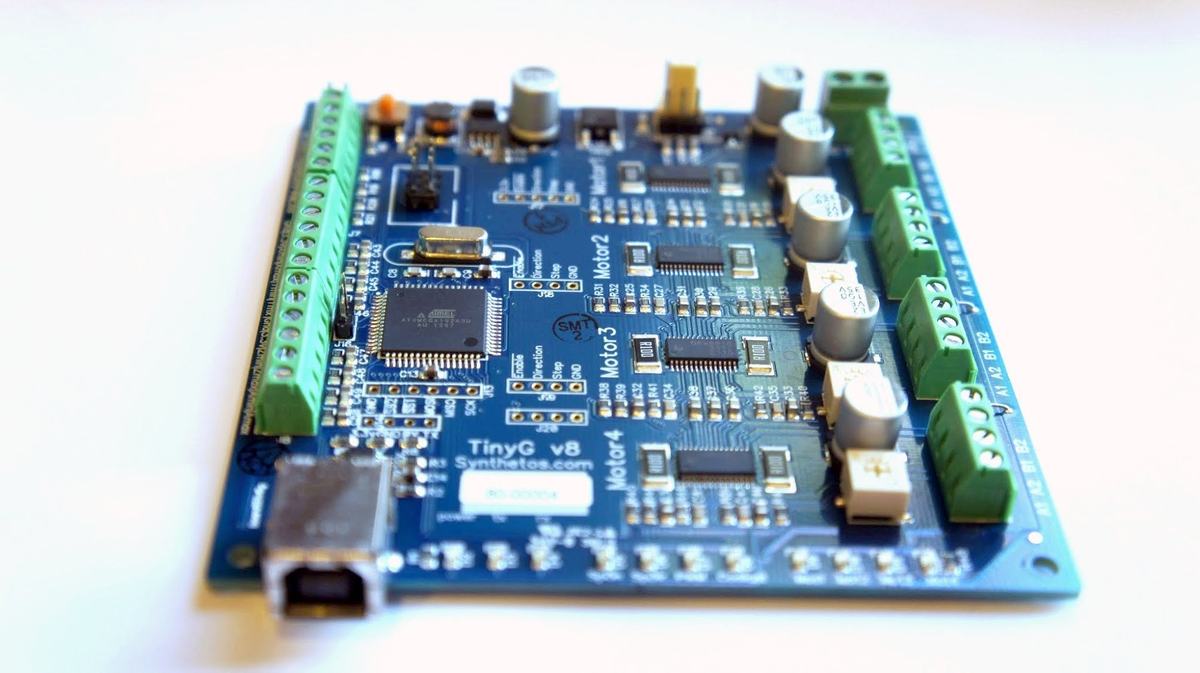
TinyG is a multi-axis motion control system for CNC machines and other applications that need precise, smooth motion. An Atmel ATxmega192 microcontroller interprets G-code sent from a host computer over USB and drives four on-board TI DRV8818 stepper drivers, so there is no PC-side real-time software to set up. It handles NEMA 17 motors and most NEMA 23s, making it a good fit for desktop mills and routers and for retrofitting older machines.
Key features
- 6-axis control (XYZ linear + ABC rotary) mapped to any of the 4 motors, so dual-motor gantries such as XYYZ are a configuration change
- Jerk-controlled (S-curve) acceleration planning for smooth, fast transitions on lines and arcs, with less vibration and chatter than constant-acceleration planners
- Smooth step generation from a phase-optimized fractional-step DDA running at 50 kHz with very low jitter
- Microstepping up to 1/8; the optimized DDA makes this smoother than many 1/16 implementations
- Feedhold and resume with full replanning, homing, probing, jogging and real-time status reports for DRO-style displays
- Per-axis jerk, velocity and feed-rate limits for tuning very different machines
- Text and JSON command interfaces for host software
- Firmware updates over USB through the boot loader; no programmer needed
Specifications
| Microcontroller | Atmel ATxmega192A3, 32 MHz |
|---|---|
| Stepper drivers | 4 × TI DRV8818, bipolar or unipolar motors (not 5-wire) |
| Motor current | 2 A per winding; 2.5 A per winding with fan cooling |
| Microstepping | Up to 1/8 |
| Axes | 6 (X, Y, Z, A, B, C) mapped to 4 motor outputs |
| Motor supply | 12–24 V DC, 4–15 A depending on motors |
| Host connection | USB (FTDI serial), 115,200 baud |
| Inputs | 8 limit/homing switch inputs (3.3 V logic maximum) |
| Outputs | 4 outputs for spindle, coolant or other uses, plus spindle-speed PWM |
| Fan header | 3-pin, jumper-selectable 12 V or motor voltage |
| Board size | 4.00 × 4.15 in (101.6 × 105.4 mm), four 4-40 mounting holes |
| G-code | Subset of NIST RS274/NGC v3, following LinuxCNC conventions (supported codes) |
| Firmware | Open source (C), github.com/synthetos/TinyG |
What's in the box
One assembled and tested TinyG v8 board. You will also need stepper motors, a 12–24 V DC power supply and a computer to send G-code; a 12 V or 24 V fan is recommended if the motors draw more than 2 A per winding or the board is in an enclosure.
Software that works with TinyG
TinyG takes plain G-code over a USB serial port. CNCjs and Universal Gcode Sender both support TinyG and g2core directly, and the TinyG wiki has setup guides for ChiliPeppr, CNCjs and CoolTerm. For machines with more power, TinyG can also drive external stepper drivers. Building or repairing a pick-and-place machine? See TinyG for OpenPnP and LitePlacer.
Getting started
- TinyG v8 start page: what you need and a map of the board
- Connecting TinyG: power, USB, motors and motor current
- Configuring TinyG for your machine
- Homing and limit switches
All guides, including firmware updates and troubleshooting, are on the documentation page.
TinyG in action

TinyG driving an OX desktop CNC milling machine (video by Thomas Shue).
TinyG or gShield?
TinyG is self-contained and runs 4 motors with jerk-controlled motion. If you already have an Arduino and only need three axes, the gShield ($49.99) may be enough. See the full TinyG vs gShield comparison.